AI TOOL / #03266
Scribo Pronto
Scribo Pronto simplifies grading and feedback for teachers and provides students with instant writing feedback.
Introduction
Scribo Pronto streamlines grading and feedback for teachers and provides instant writing feedback for students.
What is the Scribo Pronto AI Chrome extension/plugin?
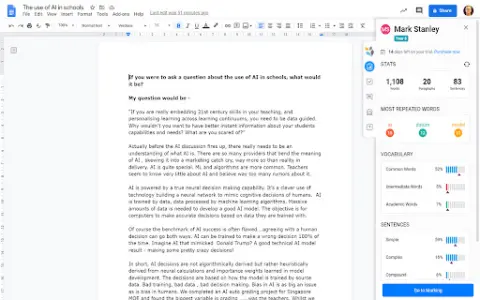
Scribo Pronto is designed to make grading and feedback convenient for English and humanities teachers, offering instant text analysis and AI-suggested feedback within Google Docs. Teachers can customize feedback, grade using rubrics, and insert all annotations into student documents with one click. It also supports students by providing instant feedback to help them improve their writing skills.
How do I use the Scribo Pronto AI Chrome extension/plugin?
Pronto launches automatically within Google Docs and provides an analysis of student writing. Teachers can add, edit, or use AI-generated feedback, grade against rubrics, and insert the analysis, annotations, and feedback into the student’s document with one click. Students can access Pronto while writing to receive instant feedback.
Core features of the Scribo Pronto AI Chrome extension/plugin
Automated student text analysis
Feedback on AI suggestions
Customizable feedback options
Rubric-based scoring
Insert feedback into Google Docs with one click.
Integration with Google Classroom
Provide students with immediate feedback.
Related
SummerEyes – AI Productivity Tool
AI-powered tools enable instant text summarization in browsers, allowing for rapid processing of information.
Blaze Feeds
An AI-powered RSS reader with smart summaries and cross-platform support.
ResearchBuddy.app
ResearchBuddy automatically generates literature reviews and briefs.
OneClick AI
OneClick AI simplifies workflows by allowing users to extract and summarize content with just one click.
PowerPost
PowerPost summarizes, translates and allows interaction with articles for quick insights.
rKnown2Notion
Notion integration for automatically syncing knowledge bases and content from Understanding Reading.