AI TOOL / #03900
AiAsk Summary
A Chrome extension tool that extracts article outlines to improve reading and research efficiency.
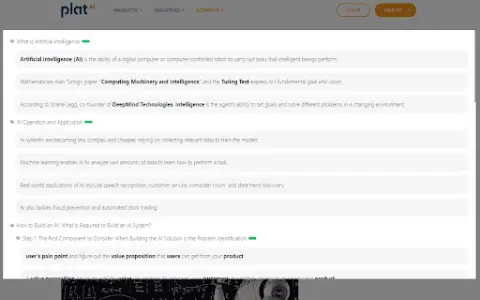
Introduction
Chrome extension that extracts outlines from articles for enhanced reading and research.
What is the AiAsk Summary AI Chrome extension/plugin?
AiAsk Summary is a Chrome extension designed to enhance your reading and research experience. It cleverly extracts the main outline of any article you browse, providing a structured overview of its content.
How do I use the AiAsk Summary AI Chrome extension/plugin?
1. Browse: Open any article in the Chrome browser.
2. Activate: Click the icon in the browser toolbar or the icon on the right side of the page.
3. Extract: This extension analyzes the article and displays a concise outline.
Core features of the AiAsk Summary AI Chrome extension/plugin
Automatic outline generation
User-friendly interface
Improve reading efficiency
Supports YouTube videos
Show detailed content when the outline is ready.
Related
SafeSpeak
AI-based protection against social engineering attacks on phone calls and text messages.
adCAPTCHA
Robotic protection that emphasizes privacy, utilizing media challenges to ensure genuine participation.
IDWise Identity Verification, eKYC & AML
An AI-based eID&V solution designed to facilitate customer onboarding and ensure compliance with regulatory requirements.
Nightfall AI for Zendesk
Data loss prevention platform for AI-based SaaS, AI applications and terminals.
MindoraAI
An all-in-one AI platform that offers tools for content creation, image processing, video production, and coding.
Flow Language Learning
An AI-powered language learning platform that utilizes real-world content to provide personalized English education.