AI TOOL / #03920
ChatGPTalk Sidebar
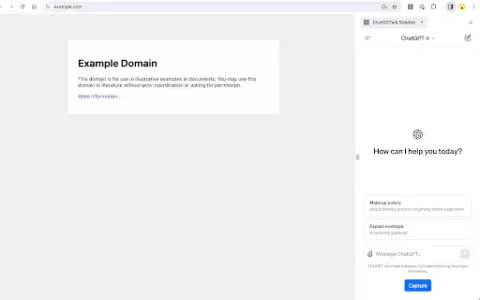
The ChatGPT integration in the sidebar facilitates text capture and interaction.
Introduction
ChatGPT integration in a sidebar for easy text capture and interaction.
What is the ChatGPTTalk Sidebar AI Chrome extension/plug-in?
The ChatGPTTalk Sidebar extension enhances the web browsing experience by integrating ChatGPT into a convenient sidebar. It allows users to extract text from web pages or YouTube subtitles and automatically copy it into the ChatGPT input field for generating summaries or performing other interactions. This extension also includes prompt templates and intelligent text segmentation features, which make it easier to work with longer documents.
How to use the ChatGPTTalk Sidebar AI Chrome extension/plug-in?
Install the ChatGPTTalk Sidebar extension. Open a web page or a YouTube video, and then click the “Capture” button in the sidebar to extract the text or subtitles. The extracted text will be automatically copied and pasted into the ChatGPT input field, along with a predefined prompt template. You can then interact with ChatGPT as needed.
The core functions of the ChatGPTTalk Sidebar AI Chrome extension/plugin
Integration of ChatGPT
Text capture
prompt template
YouTube subtitles
Intelligent text segmentation
Related
CloneGen
Voice cloning and AI voice studios allow users to create content using custom voices or those of famous individuals.
ai celebrity voice clone
AI-powered celebrity voice cloning lets you enjoy instant voice experiences right in your browser.
FluxAI Pro
Advanced AI image generation p...
Snapshot by AnswersAi
Chrome extension that provides immediate answers and learning assistance through screenshots.
Astor.ai Data Entry for Chrome
Automatically utilize AI analysis to convert invoices/receipts into accounting data.
Perfect Memory AI
Personalized AI assistant – it remembers everything you see, hear, and say.