AI TOOL / #04214
Spot AI
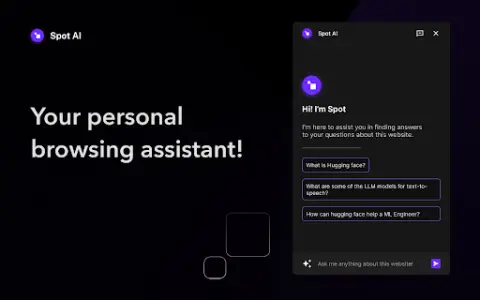
Spot AI reads web pages to answer your questions.
Introduction
Spot AI reads webpages to answer your questions.
What is the Spot AI Chrome extension/plug-in?
Spot AI is a browsing assistant that can read web content and answer questions based on that information. It enables users to easily conduct research and obtain information. It is available as an extension for Chrome and is also compatible with Brave and Arc browsers. Once installed, it can be activated by using the CMD/CTRL + K shortcut key.
How to use the Spot AI Chrome extension/plug-in?
Install the Spot AI extension in Chrome, Brave, or Arc. After installation, activate it by using CMD/CTRL + K. For the best experience, fix the extension in your browser. Then, pose your question, and Spot AI will read the relevant text on the web page to provide you with an answer.
The core functions of the Spot AI Chrome extension/plug-in
Read a web page and answer questions based on its content.
Compatible with Chrome, Brave, and Arc browsers.
Launch it by pressing CMD/CTRL + K.
Related
ChatWizard: 1-Click ChatGPT Prompts
The AI assistant provides one-click, advanced suggestions, making content creation much easier.
Lucas, AI video creator
An AI video creator that is capable of generating videos based on text prompts and offers customization options.
LightX
An AI-powered photo and video editor that offers image generation capabilities as well as customizable templates.
Cannypen
An AI content generation platform that offers tools for generating text, images, audio, and code.
AI Product Tools
AI-based tool for generating descriptions, titles, and tags for e-commerce products.
Listingcopy.ai
An AI tool designed to assist real estate professionals in creating property descriptions and advertising copy.