AI TOOL / #04897
Patent Highlighter
Browser extensions that highlight technical information in patents while suppressing legal jargon.
Introduction
Browser extension that highlights technical information in patents, suppressing legal jargon.
What is the Patent Highlighter AI Chrome extension/plug-in?
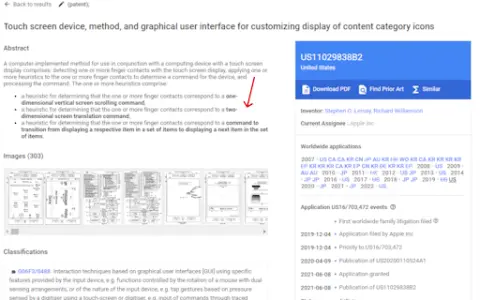
The Patent Highlighter is a browser extension designed to enhance the efficiency of reading and understanding patents. It highlights technical information within patent documents while suppressing redundant legal terminology, allowing users to quickly identify key inventions and technical details without altering the original text written by the inventors.
How to use the Patent Highlighter AI Chrome extension/plug-in?
1. Open a patent on Google Patents.
2. Click the patent highlighter extension icon in your browser.
3. Click the "Highlight" button.
4. Wait for the important information to be highlighted.
2. Click the patent highlighter extension icon in your browser.
3. Click the "Highlight" button.
4. Wait for the important information to be highlighted.
The core functionality of the Patent Highlighter AI Chrome extension/plugin
Highlight the technical information contained in the patent.
Reducing the use of redundant legal language
Maintain the original text written by the inventor.
Browser extension integration
Reducing the use of redundant legal language
Maintain the original text written by the inventor.
Browser extension integration
Related
AlgoCademy
A programming and interview practice platform with AI-assisted guidance
Diagramly
Text or screenshots can be instantly converted into editable charts.
Pitch Avatar
AI digital narrators capable of engaging in conversations
Ctruh
AI 3D and XR platforms within browsers
Decibri
A unified audio library for voice-based intelligent agents
MiniMax Code
The desktop programming and office intelligence agent of MiniMax