AI TOOL / #06135
Ask Screenshot for ChatGPT
Improve ChatGPT productivity by analyzing screenshots and selected text.
Introduction
Enhances ChatGPT productivity by analyzing screenshots and selected text.
What is the Ask Screenshot AI Chrome extension/plugin?
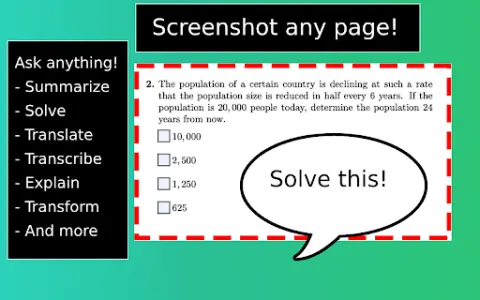
Ask Screenshot is a tool designed to improve productivity in ChatGPT, allowing users to analyze screenshots or selected text directly within ChatGPT. It offers features such as summarization, transcription, and translation, making it easier to extract information and process content from visual and textual sources.
How do I use the Ask Screenshot AI Chrome extension/plugin?
To use Ask Screenshot, right-click anywhere on any page and hover over Ask GPT to access the available screenshot templates. For selected text, right-click the selected text and hover over Ask GPT to view the available templates.
Core features of the Ask Screenshot AI Chrome extension/plugin
Screenshot and analyze: Take a screenshot and automatically open it in ChatGPT for analysis.
Text selection and analysis: Right-click any selected text to automatically open it in ChatGPT.
Related
Personage
A no-code AI companion builder that helps you monetize your audience on Telegram.
PersonifAI
A platform for creating, customizing, and interacting with AI characters, suitable for a wide range of applications.
IYO AI – Talk to AI iOS App
An AI application that allows users to engage in conversations with historical figures and explore a wide range of topics.
Infinite Convo
An endless conversation betwee...
PeopleAI 2.0
AI chatbots and digital twins that allow for personalized conversations with historical figures.
Gita GPT
AI-driven spiritual guidance based on the Bhagavad Gita, provided through chatbots.