AI TOOL / #06218
Talk with GPT Extensions
A Chrome extension for conversing with OpenAI's GPT-3 via voice or text.
Introduction
Chrome extension for conversing with OpenAIs GPT-3 using voice or text.
What is the Talk-with-GPT AI Chrome extension/plugin?
Chat with GPT is a Chrome extension that allows users to converse with OpenAI's latest language model AI. It enables a natural and engaging chat experience through voice or text input. The extension leverages Chrome's speech synthesis and text recognition features to provide a seamless conversational experience with the AI.
How do I use the Talk-with-GPT AI Chrome extension/plugin?
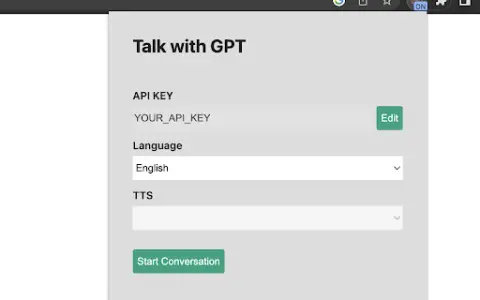
1. Get an OpenAI API key. 2. Open the extension popup. 3. Register the API key. 4. Select a language if needed. 5. Click the “Start Conversation” button. 6. In the pop-up window, click the “Click to Speak” button to start the conversation.
Core features of the Talk-with-GPT AI Chrome extension/plugin
Voice and text conversations with GPT-3
Using Chrome's speech synthesis and text recognition
A simple and intuitive user interface
Related
AI Data Collection Company
GTS: An artificial intelligence service that facilitates the collection and annotation of data for machine learning models.
UniConverter AI
A high-speed video conversion, compression and editing tool with AI enhancements.
Echonotes
Echonotes converts speech into text, enabling quick and organized note-taking while also providing AI-assisted support.
SayAI
Extensions for ChatGPT that support voice input and audio output.
transcribe4u
AI-powered speech-to-text app for converting audio files to text.
DoThread
A simple, privacy-focused app for organizing notes, tasks, and ideas into time-based threads.