AI TOOL / #07161
Screenova
Screenova is a Chrome extension designed for capturing screenshots, extracting text data, and performing AI-driven analyses.
Introduction
Screenova is a Chrome extension for screenshot capture, text extraction, and AI-powered analysis.
What is the Screenova AI Chrome extension/plug-in?
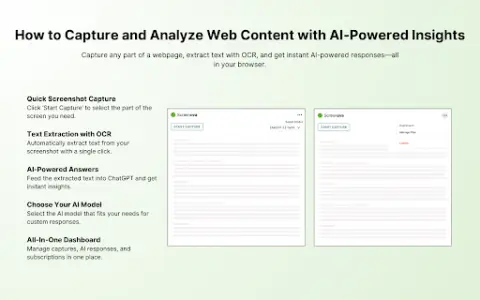
Screenova is a Chrome extension that enables users to take screenshots of web pages and utilizes advanced artificial intelligence and optical character recognition (OCR) technologies to extract, analyze, and convert the text contained in those screenshots. This enhancement significantly improves the browsing experience. Its key features include generating explanations, summaries, and action items based on the extracted text, facilitating more efficient problem-solving, and offering the option to select models from tools such as ChatGPT 3.5 and 4. By providing quick insights and enabling the extraction of text from images, this tool simplifies work processes and enhances productivity.
How to use the Screenova AI Chrome extension/plug-in?
Install the Screenova Chrome extension to capture screenshots of web pages. Utilize AI and OCR technologies to extract, analyze, and convert the text contained in these screenshots. The extension will generate explanations, summaries, and action items based on the analyzed data. You can also choose your preferred AI model (ChatGPT 3.5 or 4) for more in-depth analysis.
The core functions of the Screenova AI Chrome extension/plugin
Screenshot capture
AI-powered text extraction and analysis
Optical Character Recognition (OCR)
Text conversion
Explanation and summary generation
Creation of action items
Model Selection (ChatGPT 3.5 and 4)
AI-powered text extraction and analysis
Optical Character Recognition (OCR)
Text conversion
Explanation and summary generation
Creation of action items
Model Selection (ChatGPT 3.5 and 4)
Related
Generation of scrolling video for novels
This tool arranges the entire novel into a continuous stream of text, allowing it to scroll smoothly from bottom to top on a vertical screen – much like the subtitles at the end of a movie. The formatting, previewing, exporting, and saving of the project are all done locally within your browser; neither the main text nor any media files will be uploaded to any server.
Image Prompt Studio
Generate AI painting prompts based on field names.
Mermaid
The AI-based drawing tool developed by the Mermaid.js team
dusk bot
Use the existing AI subscription group to create a small team of robots.
CodeDesign.ai
A one-sentence solution for creating a website that can be easily exported.
Fack’d
Conduct fact-checking while watching a YouTube video in streaming mode.