AI TOOL / #07222
ReadImage
Extract, edit, and copy text from images on web pages.
Introduction
Extracts, edits, and copies text from images on web pages.
What is Image Text Extractor ai chrome extension/plugin?
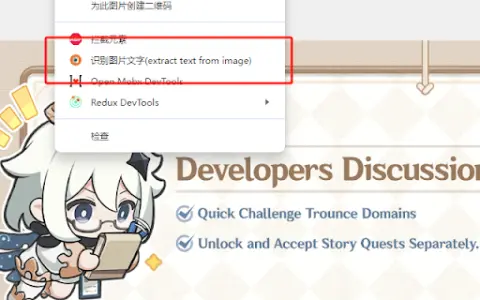
This extension allows users to extract text from images displayed on web pages. It supports common image formats such as jpg, jpeg, png and bmp. After extraction, the text can be edited and copied.
How to use Image Text Extractor ai chrome extension/plugin?
Hover your mouse over the image, right-click and select "Extract text from image". Press "Ctrl + Q" to view the extracted text on the extension page, where it can be edited and copied.
Image Text Extractor ai chrome extension/plugin core features
Extract text from images on web pages
Edit extracted text
Copy extracted text
Related
Todook Bot
An AI chatbot platform designed to automate customer interactions and facilitate sales processes.
ChatWP
AI chatbots for resolving WordPress-related issues, as well as custom chatbots developed based on documentation.
Rapidbott
A no-code platform for building and publishing conversational chatbots on multiple channels.
IdeaverseAI
A personalized AI companion chatbot that enhances conversation and AI exploration.
ebanqo.com
Conversational AI platform that automates sales and support across multiple messaging channels.
I IMAGINE
A domain-specific AI chatbot for business management, equipped with personalized AI capabilities.