AI TOOL / #07224
MediaX
The AI chat functionality has been enhanced to support file uploads, transcription, screenshot searches, and a variety of output options.
Introduction
Enhances AI chat with file uploads, transcription, screenshot search, and versatile output options.
What is the UploadGPT AI Chrome extension/plug-in?
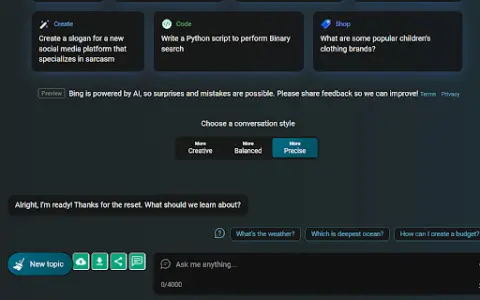
UploadGPT is a multifunctional tool designed to enhance the capabilities of AI chat platforms such as ChatGPT, Google Bard, and BING AI. It allows users to directly upload images, MP3, and MP4 files seamlessly within these chat interfaces. Furthermore, it provides instant and accurate text transcription from image, audio, and video files. Users can also perform searches using screenshots. The platform supports downloading output in various file formats, including Word, PPT, HTML, and PDF, while ensuring high-quality images are preserved. In addition, users can easily view the generated videos directly within the extension.
How to use the UploadGPT AI Chrome extension/plug-in?
Simply install the UploadGPT extension and use the upload function within ChatGPT, Google Bard, or BING AI chats. You can upload the required files (images, MP3s, MP4s) and make use of features such as transcription, screenshot search, and file format conversion as needed.
The core functionality of the UploadGPT AI Chrome extension plugin
Ability to seamlessly upload files (images, MP3s, MP4 videos) during conversations with ChatGPT, Google Bard, and BING AI.
Accurately transcribing text from images, audio, and video files.
Screenshot-based search function
Download the results in Word, PPT, HTML, and PDF formats.
High-quality image preservation
View the video directly within the extension.
Related
Upstage AI
Artificial intelligence for large language models and document processing to transform business workflows.
DocuClipper
Financial data extraction software that automatically extracts information from financial documents with high accuracy.
ocrX Image to Text
OCRX is an application designed for scanning and extracting text from images, supporting over 100 different languages.
Magic OCR
Google Chrome's OCR software converts images and documents into editable text.
Picture To Text
Free online OCR tool for extracting text from images.
People for AI
A French data annotation company that provides high-quality training data for AI algorithms.