AI TOOL / #08846
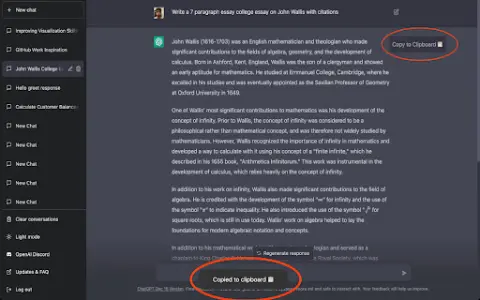
Copy for Chat GPT
An extension used to copy ChatGPT responses and check for plagiarism.
Introduction
Extension to copy ChatGPT responses and check for plagiarism.
What is the Plagiarism Detector Extension for Chrome – an extension/plug-in for Google Chrome?
This extension allows you to copy the responses generated by ChatGPT by clicking a button or using the CMD+K shortcut key, and then have those responses checked by plagiarism detection tools.
How to use the Plagiarism Detector Extension for Chrome?
You can use this extension by clicking the copy button on ChatGPT’s response or by pressing CMD+K. The copied text will be automatically checked to determine whether it contains any plagiarized content.
The core functionality of the Plagiarism Detector Extension for Chrome.
One-click to copy the response from ChatGPT
Use the CMD+K shortcut key to copy.
Automatic plagiarism detection
Related
Zap Scribe
An artificial intelligence tool provided for the preparation of reports on activities undertaken to support Lions Clubs.
navan.ai
Navan.ai: A code-free platform for building AI models and generating potential customers driven by artificial intelligence.
netify.ai
Netify provides network intelligence and visibility through in-depth packet analysis and cloud-based processing.
ThoughtfulGPT
Extension to extract LinkedIn profile information, automating cookie retrieval.
Capalyze
AI-powered data analysis assistant, designed to aid in gaining insights and making business decisions.
Scraper AI:Get Local Leads with AI
AI-based tools are used to extract commercial data and relevant insights from Google Maps.